IntelliSense Updated
AKML SQL replaces the built-in completion list with a schema-aware IntelliSense engine. It reads your actual database, so suggestions match your tables, columns, and aliases — not just keywords.
What gets completed
- SQL keywords (
SELECT,WHERE,JOIN, ...) - Tables, views, and other schema objects
- Columns, with data type, nullability, and PK/FK indicators
- Table aliases defined in your query
- Variables declared in the current script
- Built-in functions and stored procedures
- Your snippets
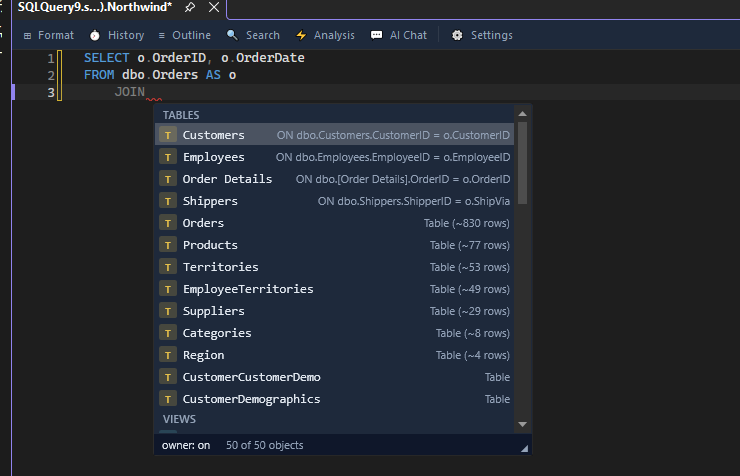
- JOIN suggestions based on foreign key relationships, with a ready-made
ONclause
The dot trigger
Type an alias or table name followed by . to list its columns:
SELECT o. FROM dbo.Orders o
After o. the popup shows the columns of dbo.Orders with type annotations such as OrderID int PK.
Expand SELECT * with a column picker
Put the cursor right after the * in SELECT * and press Tab. A picker lists the columns of the tables in the query, each with its data type, nullability and key details. Every column starts checked.
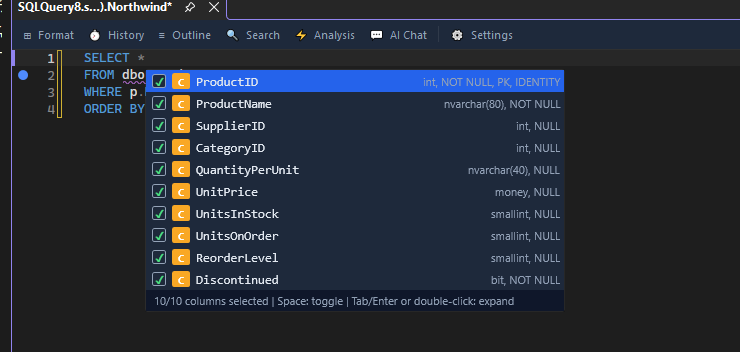
- Space checks or clears the highlighted column.
- Tab, Enter or a double-click replaces the
*with the checked columns. - Esc closes the picker and leaves the
*as it is.
The picker needs a query window connected to the database. To expand a * without choosing columns, use Expand wildcards in Format SQL or the refactoring of the same name.
Fuzzy matching and ranking
You do not need to type the exact prefix. Typing cu can match CustomerID. Suggestions are ranked by schema relevance, so columns and tables from the current query appear first.
Quick Info on hover
Hover over a table, column, procedure, or variable to see a tooltip:
- Tables: object type, row-count estimate, column count, description
- Columns: data type, nullability, default value
- Procedures: parameter list and description
- Variables: declared type
Signature help
Type ( after a function or procedure name to see its parameter list. The tooltip highlights the current parameter as you type commas, and shows types, defaults, and direction for stored procedure parameters.
The completion popup
- Each item has a type-coded icon badge, so you can tell columns, tables, keywords, and snippets apart at a glance.
- Hold Ctrl to make the popup semi-transparent, so you can read the code underneath without closing it.
Tune IntelliSense
Open AKML SQL -> Options… -> Suggestions -> Behavior to adjust auto-trigger delay, maximum suggestions, fuzzy matching, keyword casing, and more. All keys are documented in the Configuration reference.
Avoid conflicts with built-in IntelliSense
On first run, AKML SQL offers to disable SSMS's native IntelliSense so only one popup appears. You can change this later on the IntelliSense options page.